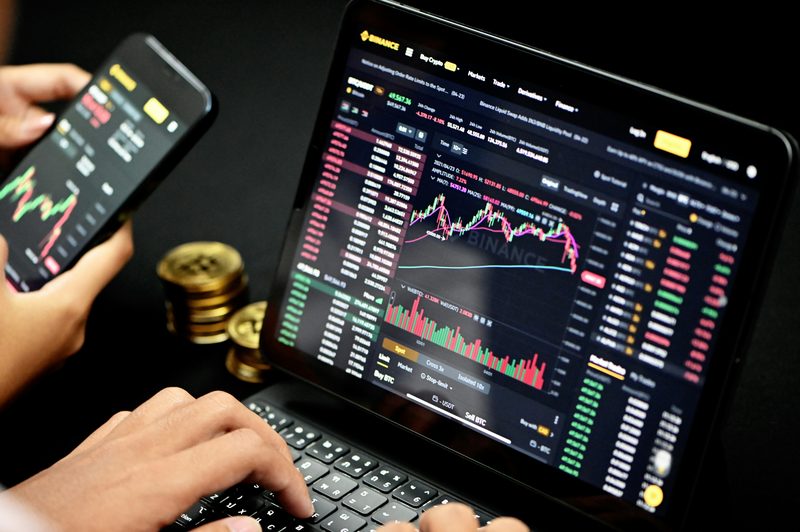
Your trading platform is the cockpit — the software where you chart the market, place your orders, set your stops, and manage your open trades. It's the tool you'll spend your trading hours inside, so it pays to understand what platforms do, which ones are out there, and how they differ from your broker. The good news is that the choice is rarely fraught: a few well-established platforms dominate, and any reliable one will do the job. This guide explains forex trading platforms: what they do, the main options, the platform-versus-broker distinction, and how to choose.
It pairs with choosing a broker, is best explored via a demo account, and is where you'll use the order types and read the charts covered elsewhere.
Key takeaways
Q: What is a forex trading platform?
A: A trading platform is the software you use to analyse the market and place and manage trades — providing real-time charts and indicators, order entry, position and account management, and often automated trading and mobile apps. It's distinct from your broker: the broker is the company that gives you market access, while the platform is the interface you actually use.
Q: What are the main forex trading platforms?
A: MetaTrader 4 (MT4) is the long-popular forex standard; MetaTrader 5 (MT5) is its broader, more feature-rich successor; cTrader is a popular alternative often associated with ECN brokers; TradingView is widely used for its excellent charting; and many brokers offer their own proprietary web, desktop and mobile platforms.
Q: How do you choose a trading platform?
A: It's shaped partly by your broker (which platforms they support) and partly by your needs — charting quality, ease of use, mobile access, and whether you want automated trading. MetaTrader 4 and 5 are the safe, widely supported defaults; TradingView excels at charting; cTrader suits ECN trading. Try a platform on a demo account before committing.
What a platform does (and isn't)
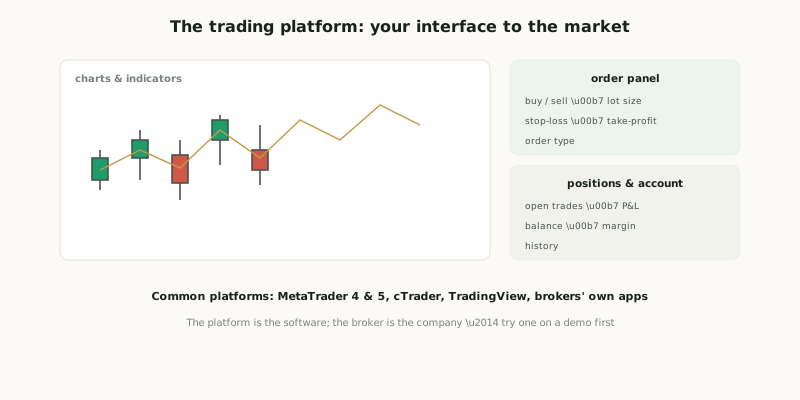
A trading platform is the software you use to analyse the market and place and manage trades. Its core functions are: real-time charts with indicators and drawing tools (for analysis — the chart-reading link); order entry (placing market, limit and stop orders, and setting your stop-loss and take-profit); position and account management (viewing your open trades, profit and loss, balance, margin and history); plus, on most platforms, news feeds, automated trading (running bots or "Expert Advisors"), and mobile apps for trading on the go. In short, the platform is everything between you and your orders — the interface through which you see the market and act on it.
A crucial distinction for beginners: the platform is not the broker. The broker is the company that gives you access to the market (covered in choosing a broker and how brokers work); the platform is the software you use to interact with that access. The same platform (say, MetaTrader 4) is offered by many different brokers — you choose a broker, and you use whichever platform(s) that broker supports. So your platform choice is partly determined by your broker, and the two decisions are related but separate.
The main platforms
A handful of platforms dominate retail forex. The table summarises them.
The main trading platforms
MetaTrader 4 (MT4) has been the dominant forex platform for many years — hugely popular, widely supported, with solid charting, indicators, all the order types, and support for automated trading via "Expert Advisors" (EAs). It's older and forex-focused, but remains a safe, ubiquitous default. MetaTrader 5 (MT5) is its successor — broader (more markets, more timeframes, additional features) and not just for forex; it coexists with MT4 rather than fully replacing it, and many brokers offer both. cTrader is a popular alternative, often associated with ECN/raw-spread brokers, known for a clean modern interface and good depth-of-market features. TradingView is widely loved for its excellent charting and analysis tools (and increasingly supports trading through broker integrations), with strong social/community features — many traders chart on TradingView even if they execute elsewhere. And many brokers offer their own proprietary platforms (web, desktop and mobile apps), which range from basic to excellent. Across all of them, the core capabilities — charts, orders, position management, often automation and mobile — are broadly similar; the differences are in interface, features, charting quality and which brokers support them.
Choosing one
Your platform choice is shaped by two things: your broker (which platforms they support — you can only use what your broker offers, so this often narrows the field) and your own needs (charting quality, ease of use, mobile access, and whether you want automated-trading support). For most beginners, MetaTrader 4 or 5 are the sensible, widely-supported defaults — capable, familiar, and offered by the majority of brokers. If charting is your priority, TradingView is exceptional; if you're with an ECN broker, cTrader is common. The best approach is simply to try a platform on a demo account first — spend time charting and placing practice trades to see whether the interface suits you, before committing real money. The honest framing: a trading platform is the software you use to chart, analyse, and place and manage trades — distinct from your broker (the company). The main ones are MetaTrader 4 (the long-popular forex standard), MetaTrader 5 (its broader successor), cTrader (often ECN-focused), TradingView (excellent charting), and brokers' own platforms; they all provide charts, order entry, position management, and usually automation and mobile apps. Your choice is shaped by your broker's offering and your needs, with MT4/MT5 the widely-supported defaults — and you should try a platform on a demo first. Remember the platform is just a tool: a reliable one that suits you is all you need; it executes your trading but doesn't, by itself, give you any edge.
Features that matter
While the core capabilities are similar across platforms, a few features are worth weighing when you choose and as you get comfortable. Charting quality is central for most traders — the range of timeframes, indicators, drawing tools, and the clarity and responsiveness of the charts — and it's where platforms differ most noticeably (TradingView, for instance, is prized precisely for its charting). Order capabilities matter: make sure the platform supports the order types you'll use (market, limit, stop) and makes it easy to attach a stop-loss and take-profit to every trade. Automated trading support matters if you intend to run or test algorithms — MetaTrader's "Expert Advisors" (via its MQL language) are the best-known retail example, letting you automate strategies (the algorithmic-trading link). Mobile apps are near-essential today for monitoring and managing trades away from your desk. And underpinning all of it, reliability and execution matter most of all: a platform that's stable, fast, and executes your orders cleanly (minimal freezing, few errors) is worth more than a feature-rich one that's flaky — though note that execution quality depends heavily on your broker too, not the platform alone.
Getting comfortable with your platform
Whichever platform you choose, an under-appreciated beginner step is to genuinely master it before risking real money — because fumbling the software is a needless and avoidable source of costly mistakes. Beginners regularly make execution errors that have nothing to do with their analysis: buying when they meant to sell, entering the wrong position size (a misplaced decimal turning a micro lot into a standard one), forgetting to attach a stop-loss, or closing the wrong trade in a panic. These "fat-finger" errors can be expensive, and they're entirely preventable by knowing your platform cold. So spend real time on a demo account learning to place, modify and close orders confidently, set stops and targets, read your open positions and account figures, and navigate quickly — until the mechanics are second nature and you're thinking about the trade, not the buttons. This fluency also supports the calm, focused state good trading requires; fighting unfamiliar software adds stress and distraction exactly when you need clarity.
A final, honest perspective: don't over-rely on platform features or imagine that a fancier platform will make you a better trader. The flashiest charting package, the most indicators, the slickest interface — none of these provide an edge; they're just tools for executing and analysing. Plenty of profitable traders use plain, basic setups, while plenty of losing traders have every bell and whistle. Choose a reliable platform that supports what you actually do and that you can operate fluently, then put your energy into your trading — your strategy, risk management and discipline — which is where results actually come from. The honest framing: a trading platform is the software you use to chart, analyse and place/manage trades, distinct from your broker; the main options (MetaTrader 4 and 5, cTrader, TradingView, brokers' own apps) share core features and differ mainly in charting, interface and broker support, with MT4/MT5 the safe defaults. Weigh charting, order support, automation, mobile and — above all — reliability; try one on a demo; and take the time to truly master it to avoid costly execution errors. But remember the platform is only a tool: pick a dependable one that suits you, master it, and focus your real effort on the trading itself, since the software executes your decisions but never substitutes for a sound strategy, risk management and discipline.
A trading platform is the software you use to chart, analyse and place/manage trades (charts & indicators, order entry with stop-loss/take-profit, position and account management, often automation and mobile apps) — distinct from your broker (the company giving you market access; the same platform is offered by many brokers). The main platforms: MetaTrader 4 (the long-popular forex standard), MetaTrader 5 (broader successor), cTrader (often ECN-focused), TradingView (excellent charting), and brokers' own proprietary apps — their core features are broadly similar. Choose based on your broker's supported platforms and your needs (charting, ease, mobile, automation); MT4/MT5 are the safe defaults, TradingView for charting, cTrader for ECN. Try one on a demo first. The platform is a tool — pick a reliable one that suits you; it doesn't give you an edge, it just executes your trading.